NTS Photo Requirements at a Glance (2026)
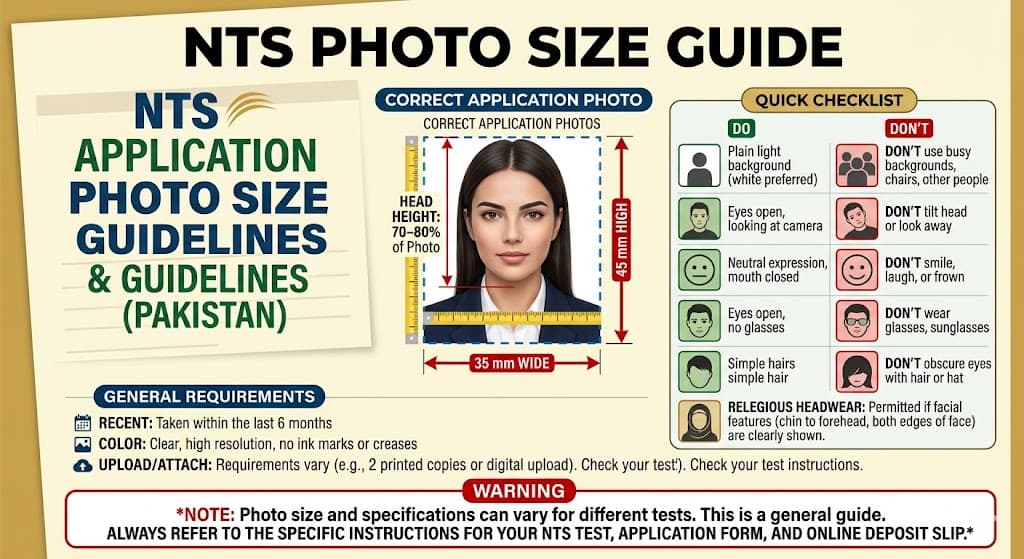
NTS (National Testing Service) is strict about photo specifications, and applications with non-compliant photos are rejected without refund. Here are the current requirements as of 2026:
| Parameter | NTS Requirement |
|---|---|
| Dimensions | 35 × 45 mm (passport size) |
| Background | Plain white |
| File format | JPEG / JPG only |
| File size | Under 50 KB |
| Colour | Colour photo (no black & white) |
| Face coverage | 70–80% of the frame |
| Expression | Neutral, both eyes open |
| Glasses | Not allowed (NTS 2024 update) |
| Head coverings | Allowed for religious reasons |
The 50 KB file-size limit is what catches most applicants. A standard smartphone photo is 2–5 MB — 40× to 100× over the limit.
Why NTS Rejects Photos
In the 2025 NAT, GAT, and NAT-IE cycles, NTS reported that photo non-compliance was the second most common reason for application rejection after incomplete educational documents. The most frequent issues were:
- Wrong dimensions — Portrait orientation but wrong aspect ratio (e.g., 4×6 or 3×4 instead of 3.5×4.5 cm)
- Coloured or gradient background — NTS requires plain white; a cream or light grey background is rejected
- File too large — Sending the original phone photo without resizing
- HEIC format — iPhones save photos as HEIC by default; NTS portals only accept JPEG
- Face too small — Wide-angle or full-body shots
- Sunglasses or tinted glasses — Prohibited since the 2024 NAT update
Step-by-Step: Prepare Your NTS Photo Free Online
You don't need Photoshop or a paid service. These free tools handle everything:
Step 1: Convert HEIC to JPG (iPhone users only)
If you took the photo on an iPhone, it's likely saved as .heic. NTS portals don't accept this format.
Go to UtilVox HEIC to JPG Converter, upload your photo, and download the converted JPEG. Takes about 5 seconds.
Step 2: Resize to 35 × 45 mm at 300 DPI
Open UtilVox Image Resizer.
- Set width to 413 px and height to 531 px (this equals 35×45 mm at 300 DPI — the correct resolution for print-quality passport photos)
- Alternatively, many online print shops in Pakistan accept 150 DPI: 207 × 267 px
- Make sure Maintain aspect ratio is unchecked so you can set exact dimensions
- Output format: JPEG
- Quality: 85–90% (this usually brings the file under 50 KB)
Download the resized photo.
Step 3: Compress under 50 KB
After resizing, check the file size. If it's still above 50 KB:
Go to UtilVox Image Compressor, upload the resized photo, and drag the quality slider down until the output is below 50 KB. For a 35×45 mm crop, quality 70–75% typically hits 30–45 KB while remaining visually sharp.
Step 4: Verify before uploading
Before submitting your NTS application:
- Right-click the file → Properties → confirm size is < 50 KB
- Open the file and check: white background, face centred, no glasses
- Confirm the file extension is .jpg (not .jpeg, .heic, or .png)
NTS Photo Specifications for Different Tests
| Test | Photo required | Portal upload limit |
|---|---|---|
| NAT-I / NAT-IE | Yes | 50 KB |
| GAT-General | Yes | 50 KB |
| GAT-Subject | Yes | 50 KB |
| NTS School Test | Yes | 50 KB |
| NTS-based job tests (FDE, PSC) | Yes | 50 KB |
The 50 KB limit applies uniformly across all NTS portals as of 2026.
FPSC and PPSC Photo Requirements
While you're preparing for NTS, here's a quick reference for other major testing bodies:
FPSC (CSS/PMS)
- Dimensions: 35 × 45 mm (same as NTS)
- Background: White
- File size: Under 100 KB (FPSC is more lenient)
- Format: JPEG
PPSC (Punjab)
- Dimensions: 35 × 45 mm
- Background: White or light
- File size: Under 100 KB
- Format: JPEG
SPSC (Sindh), KPPSC, BPSC
- Specifications vary — always check the specific advertisement
- Safe default: 35 × 45 mm, white background, < 100 KB, JPEG
For all of these, the same workflow applies: HEIC → JPG → Resize → Compress.
Where to Get a Physical Print
After preparing your digital photo, you'll often also need a physical print for the admit card. Any local photo studio in Pakistan can print from your digital file. Tell them:
"35 by 45 millimetre, white background, 6 copies on glossy paper."
Cost: Rs. 100–200 at most studios. Bring the JPEG on a USB drive or WhatsApp it to the studio.
Common Mistakes to Avoid
- Don't use a selfie — Lighting is typically uneven and the background is rarely plain white
- Don't screenshot your existing CNIC photo — Screenshot compression distorts it further
- Don't crop from a group photo — Face-to-frame ratio is usually wrong
- Don't submit in PNG format — NTS explicitly requires JPEG
- Don't reuse a 5-year-old photo — NTS requires a recent (within 6 months) photograph
Quick Reference Card
| Action | Tool | Result |
|---|---|---|
| Convert iPhone HEIC → JPG | HEIC to JPG | JPEG file |
| Resize to 413×531 px | Image Resizer | Correct dimensions |
| Compress to < 50 KB | Image Compressor | Upload-ready file |
| Check file size | Windows Explorer / Mac Finder | Verify < 50 KB |
The entire process takes under 3 minutes. Bookmark these tools now so you're not rushing on the last day of the application window.